PC apps
Clean Ultimate MAX PRO++
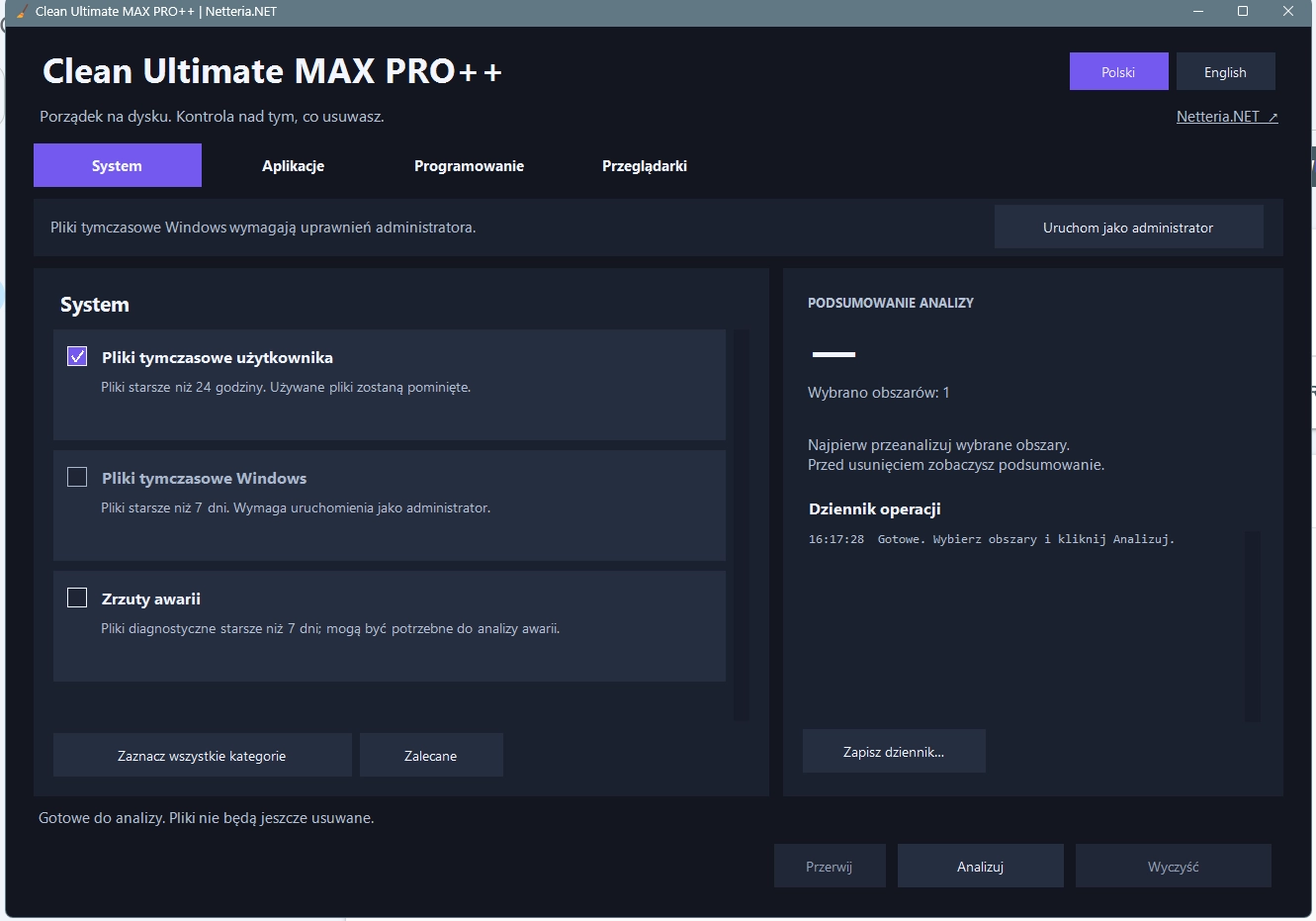
Clean Ultimate MAX PRO++ is an author's desktop application for Windows that allows you to analyze and safely delete unnecessary system, application and web browser data. The program offers a modern interface, support for many categories of cleaning, reporting generation, multilingualism and mechanisms to increase the safety of operations. The project was carried out independently from the UX/UI project, through implementation of backend and business logic, to implementation of the finished product.
Clean Ultimate MAX PRO++ is an advanced desktop application for Windows to analyze and safely remove unnecessary data from your computer. The program enables the recovery of disk space by scanning multiple system and application locations and gives the user full control over the cleaning process.
The project was created as an alternative to popular CCleaner tools, with a focus on security, transparency and detailed control over the data being deleted.
Windows Analysis
- user temporary files
- Windows temporary files
- crash dumps
- system cache
- system logs
- Windows Update Files
Application Cleaning
Supports popular programs:
- Microsoft Office
- Adobe Reader
- Visual Studio
- Teams
- Discord
- Zoom
- Spotify
- Steam
- Epic Games Launcher
Cleaning up the programming environments
- Visual Studio Cache
- NuGet Packages Cache
- epm Cache
- Composer Cache
- Python Cache
- Temporary Build Files
Cleaning browsers
- Google Chrome
- Mozilla Firefox
- Microsoft Edge
- Opera
Supported elements:
- cache
- temporary files
- download history
- session data
Key features
Multi-stage analysis before data deletion
. Detailed summary of the site recovered
. Log of operations performed
The possibility to export reports
Selective selection of cleaning areas
Supporting administrator privileges
Multilingual interface (PL / EN)
✅ Bezpieczne pomijanie plików aktualnie używanych przez system
Modern user interface
Technology used
Frontend (GUI)
- PowerShell WPF
- XAML
- own Dark UI theme system
- responsive window layout
Backend
- PowerShell 5/7
- Windows API
- Registry API
- File System Management
- Process Management
Reporting system
- log generation
- export of results
- monitoring progress of operations
- handling exceptions
Technical challenges
A number of advanced problems were solved during the project implementation:
Secure deletion of data
The program must identify files that can be deleted without risk of damaging the operating system or user application.
Permission detection
Automatic recognition of operations requiring increased administrator privileges and appropriate user information.
Scan efficiency
Optimize the analysis of large catalog structures with hundreds of thousands of files.
Multi-Application support
Each application stores temporary data at different locations, which requires individual detection mechanisms.
Multilingualism
Preparing architecture for easy addition of subsequent language versions.
My role
The project was designed and made independently from the beginning to the end.
The scope of the work included:
- analysis of requirements
- application architecture design
- UX/UI project
- backend implementation
- implementation of the graphical interface
- Functional tests
- Optimization of performance
- installation preparation
- Technical documentation
- the publication and maintenance of the product
Business effect
Clean Ultimate MAX PRO++ allows users:
- recover storage space
- speed up Windows operation
- remove unnecessary application data
- organize the development environment
- perform regular maintenance of the system with full process control